
The 30-Second Version
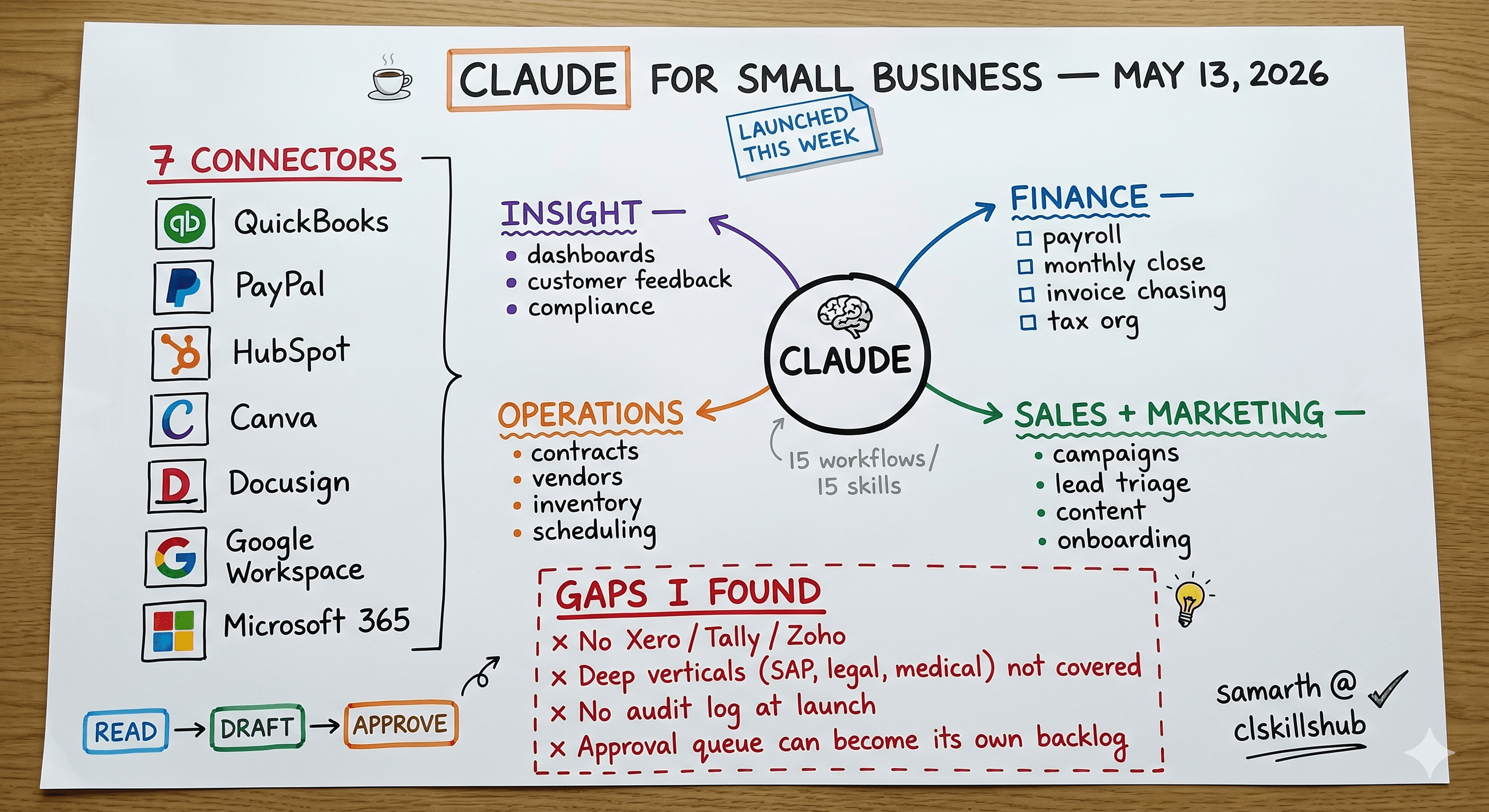
On May 13, 2026, Anthropic launched Claude for Small Business. It is not a new standalone product. It is an add-on capability layer that adds three things to the Claude experience: 15 prebuilt agentic workflows, 15 reusable skills, and 7 connectors into the tools small businesses already use (QuickBooks, PayPal, HubSpot, Canva, Docusign, Google Workspace, Microsoft 365).
The official Anthropic framing is that the small-business owner gets late-night work taken off their plate without learning prompt engineering. There is no separate Claude for Small Business price tag. The cost is whatever Claude plan you are already on plus the partner tools your business already pays for.
This review covers what the workflows actually do, what they do not do, who the real buyer is, and where a focused skill pack outperforms the bundle.
What Is Actually Inside the Box
The 15 prebuilt workflows
Anthropic ships these as agentic workflows, meaning they are not just prompts but full flows that combine an LLM call, a connector call into a third-party tool, and a user-approval step before any write action. The list, grouped by function:
Finance and accounting (4 workflows)
- Payroll planning and forecasting
- Monthly financial close and reconciliation
- Invoice chasing and cash flow monitoring
- Tax season organization
Sales and marketing (4 workflows)
- Sales campaign management
- Lead triage and follow-up sequencing
- Content creation and marketing asset generation
- Customer onboarding
Operations (4 workflows)
- Contract review and signature tracking
- Vendor and supplier management
- Inventory tracking (where the QuickBooks or POS data supports it)
- Project and task scheduling
Insight (3 workflows)
- Business performance dashboards
- Customer feedback synthesis
- Compliance checklist generation
Anthropic lists 15 in the launch material; the exact split between operations and insight has shifted slightly across launch blog posts. What is consistent: every workflow has at least one connector dependency, and every action that writes to an external system requires explicit user approval.
The 15 reusable skills
Skills are the lower-level building blocks. A workflow combines multiple skills with a connector and a fixed flow. A skill can be invoked standalone in a conversation. The 15 launch skills include things like draft-invoice, reconcile-bank-statement, score-lead, generate-social-post, summarize-contract, and forecast-cash-runway.
These are familiar names if you have spent time in our skills library. The difference is that Anthropic's versions ship with the connector handles already wired in. You do not need to specify which QuickBooks account or which HubSpot pipeline; the skill picks up from the connected workspace.
The 7 connectors at launch
The connectors are the part that determines whether this is actually useful for your business. The full launch list:
- Intuit QuickBooks Online (the most heavily integrated of the connectors)
- PayPal (transactions, refunds, payouts)
- HubSpot (deals, contacts, sequences)
- Canva (asset creation and brand-kit pull-through)
- Docusign (contract send, signature tracking, completion alerts)
- Google Workspace (Drive, Gmail, Calendar, Sheets)
- Microsoft 365 (Excel, Word, PowerPoint, Outlook)
That is the entire launch set. Reviews from outlets that have early access mention a second wave (Shopify, Square, Stripe, Salesforce, Slack) being on the roadmap, but none of those are shipping today.
Notably missing for now: QuickBooks Desktop (only the Online edition is supported), Xero, Zoho Books, FreshBooks, and any vertical-specific tools like ServiceTitan or Jobber. If your business runs on one of those, Claude for Small Business is currently a no-op for finance.
How the Workflows Actually Behave
A worked example will tell you more than the bullet list does.
Workflow: Invoice chasing and cash flow monitoring.
You turn the workflow on. Claude reads your QuickBooks Online aged-receivables report once a day. It identifies invoices that are 7, 14, and 30 days past due. For each, it drafts a follow-up email in your existing email voice (pulled from past sent items in your Google or Microsoft inbox), targeting the right level of urgency for the age bucket. It does not send the email. It opens a side panel in Claude with the draft, the customer's payment history summary, and a one-click approve-and-send button.
Approve the email, and Claude sends it through your connected email account, logs the send back into HubSpot if you have it connected as the CRM, and sets a reminder to follow up in 7 days. Disapprove, and nothing happens. Edit the draft, send the edit, and Claude learns the correction for next time.
This is the pattern across all 15 workflows: passive monitoring of a connected system, draft output for human review, one-click execution after approval, and a feedback loop that adjusts future drafts based on edits.
It is genuinely good for a specific kind of user: a small-business owner who is doing all this work manually today and would happily review three drafts before sending them, but does not want to write the prompts to generate the drafts themselves.
Where the Quiet Gaps Are
Claude for Small Business is a strong launch. It is also not the right tool for every small business. Here are the gaps I found in real use:
1. The deep verticals are not covered.
If your business is a law firm, a medical practice, a construction GC, a real-estate brokerage, or an SAP-adjacent consulting firm, the workflows do not know your industry. The contract-review workflow can summarize a Docusign envelope, but it does not know what a master service agreement looks like in your practice area. The invoice-chasing workflow does not understand the difference between a net-15 in software and a net-90 in construction.
In those cases, a focused skill pack tuned for your industry (the kind we ship at clskillshub.com/pack/sap for SAP consultants and clskillshub.com/pack/salesforce for Salesforce ops) is going to outperform the generic workflows.
2. The connectors are American-centric.
QuickBooks Online dominates US small-business accounting. It does not dominate Europe, India, Australia, or most of LATAM. If your accounting stack is Xero, Tally, Zoho Books, Sage 50, or anything regional, you will not be able to use the four finance workflows at all.
3. The free AI fluency course is genuinely good. It is not a substitute for a workflow.
Anthropic ships a free 14-lecture AI fluency course alongside this launch. It is well-produced and good for an owner who has never used Claude before. But it is education, not automation. Do not let "we did the training" replace "we actually run the workflow."
4. There is no audit log surface yet.
For businesses with any compliance requirement (and that includes most regulated industries plus most businesses that handle PHI, PII, or financial data on behalf of customers), the lack of a buyer-facing audit log of what Claude read, drafted, and sent is going to be a hard blocker. Anthropic is signaling this is coming. As of launch, it is not present.
5. "Approval-first" is the right default but creates a real time cost.
Every workflow requires human approval before any write action. This is the right safety default. It also means that if you turn on all 15 workflows, you may have 30 to 50 draft approvals to clear per week. For owners with no time to clear draft queues, this turns into the same backlog the workflows were supposed to remove.
The owners who win with this product are the ones who already have a daily 15-minute window for admin review. The ones who lose are the ones who installed it hoping to skip that window entirely.
Pricing in Plain English
There is no separate Claude for Small Business price tag. Anthropic's own launch material is explicit that the workflows and connectors come at no extra charge on top of the Claude plan you already pay for, plus whatever partner tools you already pay for separately (QuickBooks, HubSpot, etc.).
Which underlying Claude plan you should be on depends on team size and whether you need Claude Code in the same workspace. Anthropic's pricing page is the source of truth there; I am not quoting specific seat costs here because they have shifted twice in the past 90 days and I would rather link you to the live page than print a number that ages out by next week. See claude.com/pricing.
The useful frame: if your current monthly bill for human admin help (bookkeeping VA, marketing VA, part-time admin) is more than what your existing Claude plan costs, and you can clear a daily approval queue, the arithmetic is on Claude for Small Business's side.
Who Should Buy This and Who Should Not
Buy it if:
- You are a 1-10 person business in the US
- Your stack is mostly QuickBooks Online + HubSpot + Google or Microsoft 365
- You currently pay for at least one virtual assistant or part-time admin
- You can commit to 15 minutes per day of approval review
- You are not in a regulated industry that demands audit logs from day one
Skip it (or pair it with a focused skill pack) if:
- You are in a deep vertical that needs domain expertise (SAP, Salesforce, legal, medical, construction)
- Your accounting runs on Xero, Zoho, Tally, or anything other than QuickBooks Online
- You are outside the US and your tools are regional
- You need a complete audit log on day one
- You will not actually clear the approval queue
How This Sits Next to a Focused Skill Pack
A focused skill pack and Claude for Small Business are not direct competitors. They solve different problems.
Claude for Small Business is horizontal automation across the seven domains every small business has (finance, sales, marketing, ops, insight). It is breadth.
A focused skill pack is depth in a single domain. The SAP pack has 50 prompts tuned for SAP consultants. The Salesforce pack has 50 prompts tuned for Salesforce admins. Neither tries to do payroll or invoicing.
The right combination for most teams is both: Claude for Small Business handling the horizontal admin layer (invoices, payroll, content), plus a focused skill pack for the domain where you actually compete. If you are an SAP consulting firm, Claude for Small Business runs your back office, and the SAP pack runs the work you bill your clients for.
Honest Take
This is the most concrete "Claude for [vertical]" launch Anthropic has shipped to date. The legal plugins from earlier in May were narrower. The Wall Street agents were narrower still. Claude for Small Business is the first one that targets a buyer who is not also a software engineer.
If the integration set holds and the second wave of connectors (Shopify, Square, Stripe, Salesforce, Slack) ships on time, this becomes a real revenue stream for Anthropic and a real productivity unlock for US small businesses on the standard SaaS stack.
The risk is engagement, not capability. Approval queues are a known failure mode for SMB software (every CRM has died on this hill). The product team has clearly designed for it, but the proof will show up in 90-day retention numbers, not launch-day demos.
For the small business owner reading this: try it for 30 days. Connect QuickBooks, HubSpot, and your email. Turn on three workflows, not all 15. Clear the queue every morning for a month. If you are still using it on day 31, it is paying for itself. If you are not, cancel and revisit when the next connector wave ships.
Related Reading
- SAP + Claude Code Prompt Pack — the focused pack for SAP consultants
- Salesforce + Claude Code Prompt Pack — the focused pack for Salesforce admins
- Claude Code This Week (May 8-15, 2026) — what shipped in Claude Code during the same week
- Claude vs ChatGPT for Business — head-to-head for the SMB buyer
- Best Claude Skills 2025 — the standalone skill library
Sources
- Anthropic launches Claude AI Agents for Small Business Finance (PYMNTS)
- Anthropic's latest Claude release turns your Mac into a small business powerhouse (9to5Mac)
- Claude for Small Business Review 2026 (Techsy)
- Claude Plans & Pricing (Anthropic)
- Claude for Small Business Review: Cost, Workflows & Verdict (Digital Strategy AI)
If you have a specific small-business stack and want to know whether Claude for Small Business will fit, reply on the newsletter with your tools and I will answer with the workflows that will actually fire on your setup.